
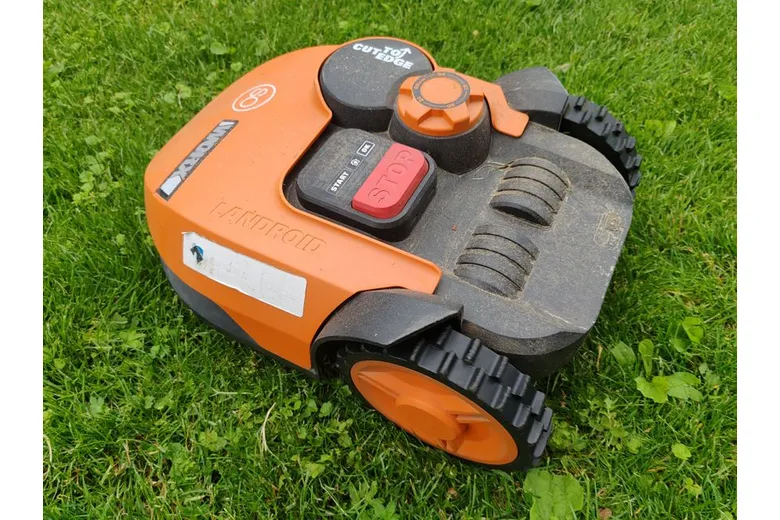
How to Choose an Installation Spot for Robotic Mowers
Choosing the right installation spot for your robotic mower is the most important decision you will make for a low effort, perfectly cut lawn. A good location keeps the unit safe, ensures consistent operation, and reduces interruptions. This guide walks you step by step through the key factors like lawn size, terrain slope, sunlight exposure, and obstacle proximity.
Pick a Central and Open Area
The charging station should be placed in a central part of your property. A central spot reduces travel time and helps the robot cover the whole lawn evenly. Look for an open area with enough space around it for easy maintenance and unobstructed access.
Make sure the station is near a permanent power outlet. Weatherproof outdoor extension cords should be used only if absolutely necessary and installed according to local guidelines. Keep the station away from places that flood or collect heavy runoff after rain. Check that the signal between the robot and the station is strong in that location.
Measure Your Lawn Size
Before you choose a spot, understand the total lawn size you need to cover. Robotic mowers are often rated for specific maximum areas. Compare these limits with the actual measurements of your yard to ensure the robot can handle the workload comfortably.
Large or oddly shaped lawns may benefit from a station placed slightly off center. This can improve coverage in distant corners and reduce the number of times the robot needs to turn back. Use boundary wires to define exactly where the robot is allowed to go.
Evaluate Terrain Slope
Check the terrain slope in the area where you plan to place the charging station and boundary wire. Steep slopes can affect the robot’s traction and its ability to return to the dock safely. Install boundary wires on flatter ground whenever possible.
If your yard has significant slopes, place the station at the bottom of the slope rather than at the top. This makes it easier for the robot to enter and exit the charging dock. Also verify that the station itself sits firmly and will not roll or shift after installation.

Understand Sunlight Exposure
Sunlight exposure plays a big role in the performance of both the robot and its solar assist options. The charging station should receive ample sunlight if your model uses a solar panel to help maintain battery life. Avoid placing the dock in deep shade cast by trees, walls, or structures.
Direct, bright sunlight for many hours each day helps keep the battery in good condition and reduces downtime. At the same time, extremely hot surfaces, like metal steps in full sun, can sometimes cause overheating warnings. Observe how the sun moves across your yard throughout the day before you finalize the location.
Look at Obstacle Proximity
Examine obstacle proximity around the chosen installation spot. Keep the robot and its dock away from objects that can block its path or damage components. Common obstacles include swing sets, patio furniture, dog houses, and garden decorations.
Maintain clear space in front of the charging port so the robot can dock smoothly every time. Secure or remove loose items that could be caught by the mower or blown into its path. Good planning around obstacles reduces errors and extends the life of your equipment.
Boundary Wire Planning
Plan the layout of your boundary wire carefully before you install it. The wire creates a virtual fence that keeps the robot inside the designated mowing area. Place the wire well away from the charging station to avoid signal interference that could affect docking accuracy.
Use the provided stakes to keep the wire at the correct height above ground. Make gentle curves instead of sharp corners to help the robot follow the path naturally. Test the system with the robot powered on before you bury or hide the wire.
Step by Step Installation Checklist
Follow this simple checklist to confirm that your installation spot is ideal. Review each point carefully before you mount the dock and start programming mowing schedules.
- Choose a level spot close to the center of the mowing area.
- Ensure there is easy access to a weatherproof power outlet.
- Confirm that the lawn size matches the robot’s capacity.
- Check the terrain slope around the station for stability.
- Observe sunlight exposure throughout the day.
- Map out obstacle proximity and clear hazards.
- Plan boundary wire routes with minimal sharp turns.
- Test signal strength between the robot and the dock.
- Verify that the dock will not be disturbed by lawn care tasks.
- Keep the area free of toys, tools, and garden hoses.
Environmental and Weather Considerations
Think about long term environmental factors when you decide where to place the dock. Extreme weather such as heavy snow, intense heat, or strong winds can affect performance and safety. Choose a location that offers some natural protection without sacrificing signal quality.
Avoid low spots where water can pool during heavy storms. If you live in a region with harsh winters, you may need a plan to store the robot safely during off season periods. A covered area nearby can make seasonal maintenance much easier.

Troubleshooting Common Placement Issues
Even with careful planning, you might notice small issues after installation. Weak signal, frequent error messages, or the robot failing to dock can often be traced back to the installation spot. Small adjustments usually solve these problems without major rework.
Move the dock a few feet left or right if the robot struggles to find it. Raise the charging port slightly if grass or mulch is blocking access. Relocate the boundary wire if it is too close to metal fences or underground utilities. Patience and small test runs help you fine tune the setup.
Signal and Connectivity Factors
Some robotic mowers rely on Wi Fi or mobile data for smart features. Check that the chosen location has a reliable network signal if you plan to use app based controls. Thick walls, metal structures, or dense foliage can block wireless communication and cause delays in commands.
Consider placing the dock near your home’s router if connectivity is weak. Using a wired Ethernet connection for the base station can also improve stability. Strong signal leads to smoother operation, especially during automatic updates or remote monitoring.
Frequently Asked Questions
How close should the robotic mower dock be to the house?
The dock should be close enough for easy wiring and access, but far enough to avoid damage from doors, windows, or gardening work. A distance of three to five meters often works well, as long as the signal remains strong.
Can I place the robotic mower dock on a slope?
It is best to avoid placing the dock directly on a steep slope. If necessary, build a level platform or use retaining steps to create a stable area. An uneven dock can cause alignment problems and false error messages.
What happens if my lawn size exceeds the robot’s capacity?
Overloading the unit can lead to incomplete mowing, reduced battery life, and extra wear on the motors. You may need to divide the area with boundary wire or consider a larger model if your lawn size is consistently too big.
Does sunlight exposure affect battery life significantly?
Yes, very low sunlight exposure can reduce solar charging efficiency, while intense heat can trigger thermal protection. Aim for a location with balanced light and shade for best long term performance.
Conclusion
Taking the time to plan your installation spot carefully pays off in reliable, low effort lawn care. A well placed dock, clear boundaries, and attention to lawn size, terrain slope, sunlight exposure, and obstacle proximity keep your robotic mower running smoothly.
Follow the checklist, adjust as needed based on real world tests, and your robotic mower will maintain a healthy, even cut throughout the season with minimal manual intervention.